
Free guides, reference charts and practical tools for music production, voiceover and audio mixing.

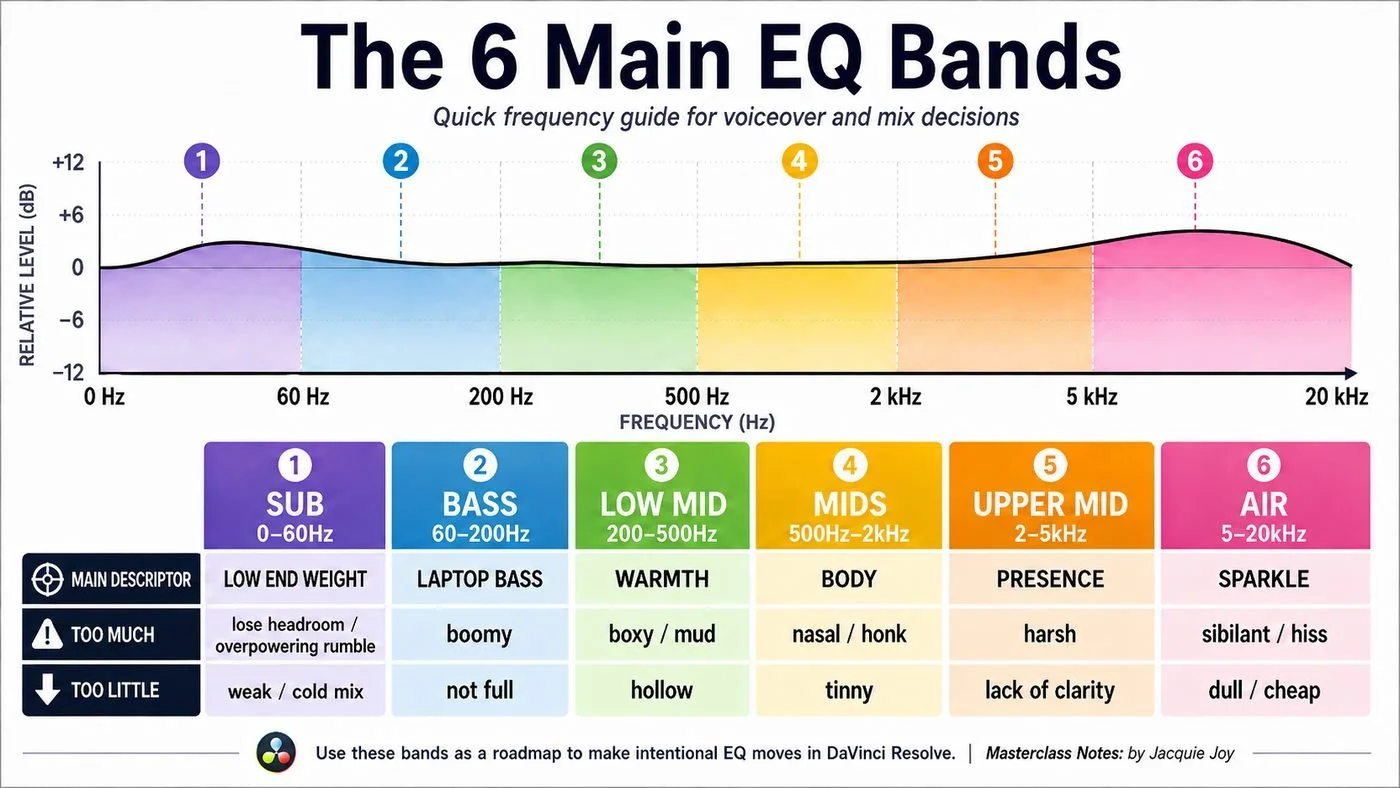
The 6 Main EQ Bands — Quick Reference Guide
This visual EQ guide breaks the frequency spectrum into six easy-to-understand areas — Sub, Bass, Low Mid, Mids, Upper Mid and Air.
Each band includes a simple descriptor for its role in the mix, plus common signs of having too much or too little in that frequency range. It’s designed to help you quickly connect what you’re hearing — such as boominess, muddiness, harshness, lack of clarity or dullness — with the part of the frequency spectrum you may want to investigate.
Use it as a practical starting point for EQ decisions when working with voiceover, dialogue, music or a full mix. The frequency ranges are a guide rather than fixed rules, so always listen in context and adjust according to the individual sound.
Great for: beginners learning EQ, voiceover and dialogue mixing, music production, and anyone wanting a quick visual frequency reference while mixing.

VO & Dialog EQ- Starter Guide
This simple starter guide is designed to give you a clear, practical starting point when EQ’ing voiceover or dialogue.
The frequency ranges and terminology used here build on my “The Main EQ Bands” guide above, helping you identify common problem areas and understand where you might cut or boost.
Use these suggestions as starting points rather than fixed rules — every voice is different, so always listen in context and make adjustments based on what you hear.
I hope this guide helps make EQ feel a little simpler and gives you more confidence as you develop your own mixing workflow.
I created these simple visual guides while developing an introductory audio mixing masterclass for voiceover and music projects, specifically aimed at YouTube video production.
The class was designed for DaVinci Resolve users but can be applied to any editing software/DAW. As an Ableton Live user myself, I’ve gone back to the fundamentals of EQ and mixing, focusing on simple, practical techniques that can be applied using DaVinci Resolve’s native audio tools and plugins.